
Code Co-op Version Control5.0 - Download
You'll be able to download in few seconds.
Publisher Description
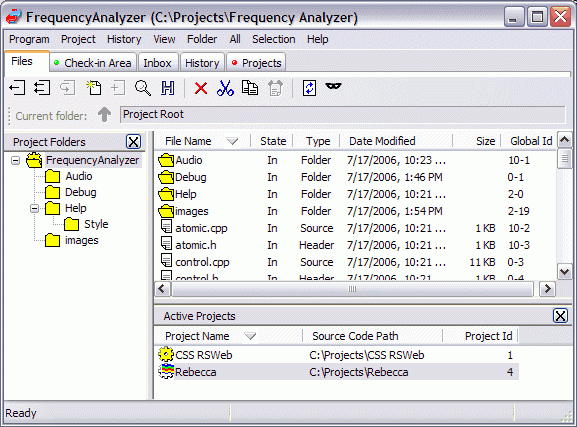
Forget about high priced version control and configuration management systems. Forget about central servers. Simplify your code development with Code Co-op, the affordable peer-to-peer version control system for distributed development. With Code Co-op your team has complete access to your projects on- and off-site regardless of a network connection. Integration with many IDEs is seamless. Project changes are distributed automatically via Email or LAN enabling you to focus on what's important your development. Code Co-op provides you with all the functionality you need including project access 24/7, automatic change notification, built-in wiki support and optional bug database, concurrent check-outs, code review with the built-in visual editor/differ, merging, and branching. Customize Code Co-op to use your favorite editor. Integrates with Beyond Compare and Guiffy SureMerge for alternative diffing and merging. Supports all file types and integration with VS.Net, VB, Borland Delphi, C++ Builder and other tools using the MS SCC API.
About Code Co-op Version Control
This Management & Distribution program is available in English. It was last updated on 29 September, 2026. Code Co-op Version Control is compatible with the following operating systems: Windows.
The company that develops Code Co-op Version Control is Reliable Software. The latest version released by its developer is 5.0.
The download we have available for Code Co-op Version Control has a file size of 5.2 MB. Just click the green Download button above to start the downloading process. The program is listed on our website since 2006-12-03 and was downloaded 0 times. We have already checked if the download link is safe, however for your own protection we recommend that you scan the downloaded software with your antivirus. Your antivirus may detect the Code Co-op Version Control as malware if the download link is broken.
How to install Code Co-op Version Control on your Windows device:
- Click on the Download button on our website. This will start the download from the website of the developer.
- Once the Code Co-op Version Control is downloaded click on it to start the setup process (assuming you are on a desktop computer).
- When the installation is finished you should be able to see and run the program.
Program Details
System requirements
Download information
Pricing
Version History
version 5.0
posted on 2006-12-03
Includes SMTP/POP3 support, built-in wiki support with wiki bug database, branch merge, and extensive GUI improvements to simplify the review of incoming and historical change records
Disclaimer
External Download
We do not host Code Co-op Version Control on our servers. We did not scan it for viruses, adware, spyware or other type of malware. This app is hosted by the software publisher and passed their terms and conditions to be listed there. We recommend caution when installing it.
The external download link for Code Co-op Version Control is provided to you by apps112.com without any warranties, representations or guarantees of any kind, so access it at your own risk.
If you have questions regarding this particular app contact the publisher directly. For questions about the functionalities of apps112.com contact us.
